Data objects
The Fluid widgets receive structured data from the host site as stringified JSON attributes. This page is the single reference for those object shapes. All the types are available in the @fluidpayments/types package.
| Object | Fluid Widget | Quick Deposit | Sweepstakes (Virtual) |
|---|---|---|---|
| User Data | Yes | Yes | Yes |
| Bonus Data | Yes | Yes | No |
| Transaction Limits | Yes | Deposit only | Yes |
| Virtual currencies and balance | No | No | Yes |
| Packs | No | No | Yes |
User Data Object
Used for resolving Suggested Deposit Amounts and Payment Methods Order with use of Machine Learning based on historical transactions' data.
The structure, available as the FluidUserData type, is as follows:
type FluidUserData = {
	age?: number;
	affiliateId?: string;
	depositCount?: number;
	daysSinceRegistration?: number;
	fullName?: string;
	kycStatus?: FluidKycStatus;
	lifetimeDeposit?: number;
	previousDeposit?: number;
	tags?: string[];
};
KYC Status Representation
The possible values for the kycStatus field are:
export enum FluidKycStatus {
    VERIFIED = 'verified',
    UNVERIFIED = 'unverified',
    PROCESSING = 'processing'
}
All the properties are optional.
Bonus Data Object
Applies to the Fluid Widget and Quick Deposit. The structure containing sample data (type FluidBonusData) is as follows:
const bonusData = [{
    "code": "DepositBonus",
    "title": "Deposit Bonus",
    "description": "100% up to 200€ + 10 Mega Spins",
    "logoUrl": "https://<operator-site>.com/assets/img/rewards/bonus-img/deposit-bonus.png",
    "maxBonus": 200,
    "maxBonusPercentage": 150,
    "minDeposit": 10,
    "maxDeposit": 250,
    "minDepositCount": 2,
    "maxDepositCount": 10,
    "minDaysSinceRegistration": 25,
    "maxDaysSinceRegistration": 180,
    "selected": true,
    "termsAndConditions": "Welcome Offer Terms And Conditions 1...",
    "success": {
        "description": "Your 100% bonus up to €200 and 10 Mega Spins have been added to your account."
    },
    "paymentMethodFilter": {
        "applyTo": [
            {
                "providerType": "CREDITCARD"
            },
            {
                "providerType": "WEBREDIRECT",
                "service": "BLIXTPAY"
            }
        ],
        "excludeFrom": [
            {
                "providerType": "JETON"
            }
        ]
    }
}]
- The
termsAndConditionsof the bonus should be provided as an HTML string. - The
logoUrlrepresents the URL of the bonus image*. IflogoUrlis absent or the path is 404, a fallback image will be used. This fallback image has to be set from the CMS's theme. - Bonus codes will be available for all payment methods unless a
paymentMethodFilteris specified. - If a
paymentMethodFilteris used, the bonus is applied depending on the properties set.- If
applyTois set then the bonus only would apply to those listed payment methods. - If
excludeFromis set then the bonus won't apply to those payment methods.
- If
providerTypeis sufficient if the payment method does not have aservice. Both values should be provided exactly as in Payment Provider configurationmaxBonusandmaxBonusPercentageare not mandatory.maxBonusPercentagerequires amaxBonusvalue.minDepositis an optional property indicating the minimum deposit amount required for the bonus.maxDepositis an optional property indicating the maximum deposit amount required for the bonus.minDepositCountis an optional property indicating the minimum number of past deposits required for the bonus.maxDepositCountis an optional property indicating the maximum number of past deposits allowed for the bonus.minDaysSinceRegistrationis an optional property indicating the minimum days since player registration required for the bonus.maxDaysSinceRegistrationis an optional property indicating the maximum days since player registration required for the bonus.- If there is a
maxBonusbut nomaxBonusPercentage, it is assumed thatmaxBonusPercentageis 100% (see Bonus amount calculation below). selectedis an optional property indicating the bonus should be preselected. If more than 1 bonus is set to true a bonus configuration error will be thrown. See Preselecting a bonus below.successis an optional object with adescriptionstring. When provided, itsdescriptionis shown on the deposit success screen in place of the bonustitleanddescription, letting you tailor the confirmation message. When omitted, the success screen shows the bonustitleanddescriptionas before. Applies to the standard cashier only (not the Sweepstakes success screen).
*Bonus logo image size should be 84x84px (168x168px for retina)
Bonus amount calculation
The maxBonus property defines the maximum bonus amount that can be claimed. For example, with the preselected bonus shown below, the maxBonus amount would be 150€.
The maxBonusPercentage property defines the multiple applied to the amount deposited by the user to calculate the bonus amount added. This multiple is expressed as a percentage. For example, if the maxBonusPercentage is 150% and the user deposits 50€, then the bonus amount would be 75€ (50 x 150% = 75). As a second example, if the maxBonusPercentage is 100% and the user deposits 200€, the bonus amount would be 200€ (200 x 100% = 200). In the image below, the maxBonusPercentage is 100%, hence the text "100% up to 150€ + …" for the login bonus.
Preselecting a bonus
A specific bonus can be preselected by setting "selected": true on the corresponding entry in the bonuses array. The preselected bonus must be part of the bonuses array passed to the widget. The bonuses attribute is observed, so the preselection can be changed after the wallet has loaded. Preselection is useful when the user is referred to the operator with a specific bonus offer, for example.
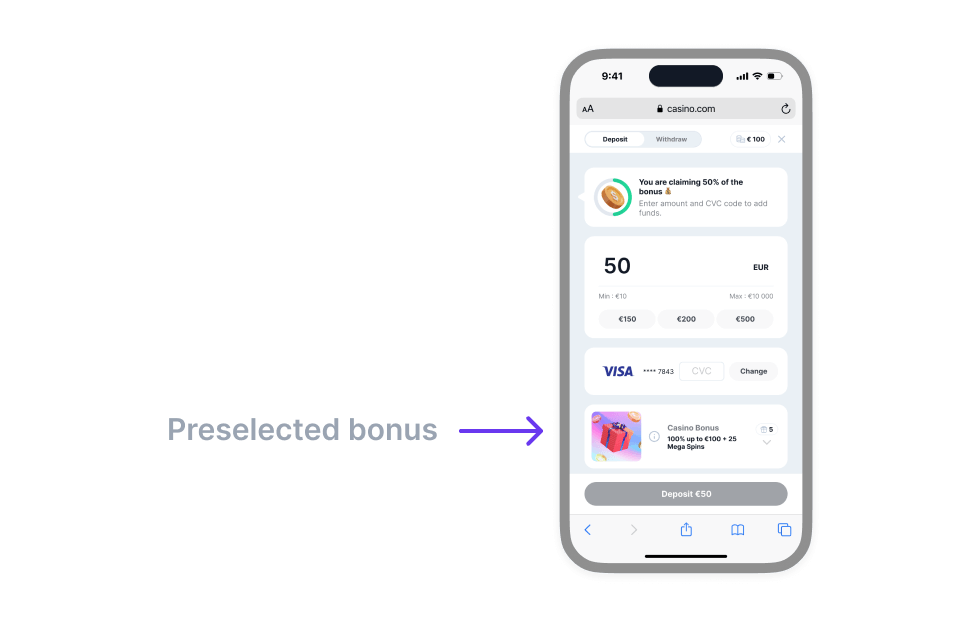
Figure - Example of a Preselected Bonus
Transaction Limits Object
The transaction-limits attribute caps how much the player can deposit or withdraw, with an optional message of your own for each. Its shape and the rules around it live on the Transaction Limits page.
Virtual currencies and balance
Applies to the Sweepstakes (Virtual) widget only.
The virtual-currencies attribute carries the virtual currencies held by the user, an object of type VirtualCurrencies stringified as JSON:
type VirtualCurrencies = {
    version: 2;
    currencies: VirtualCurrency[]; // all currencies, including the two main ones
    primaryId: string; // references VirtualCurrency.id (the currency to play with)
    secondaryId: string; // references VirtualCurrency.id (the redeemable currency)
};

type VirtualCurrency = {
    id: string; // stable identifier used to reference the currency; not shown to users
    name: string;
    code: string; // display ticker, e.g. "GC"
    symbol: string;
    exchangeRateToFiatCurrency?: number; // required for the primary and secondary currencies, optional for extra catalogue currencies
    icon?: string;
    conversionOffset?: number;
};
The balance attribute carries the current user balances, an object of type VirtualBalance stringified as JSON:
type VirtualBalance = {
    version: 2;
    primaryBalance: number;
    secondaryBalance: number;
    lockedSecondaryBalance?: number;
};
Contract version. The virtual-currencies, balance, and packs payloads are versioned. Set version: 2 to use the multi-currency shape shown here. Payloads without a version field are still accepted, so existing integrations keep working. New integrations should send version: 2. See Backwards compatibility.
Packs Data Object
Applies to the Sweepstakes (Virtual) widget only.
Fluid Virtual renders packs from two pools and three dedicated promotional slots. The regular and promoted pools together form the pack browsing area, with promoted packs listed first. When the pack set declares categories, users browse that area through a row of category pills (see Pack categories); without categories, the packs render as a single grid next to a custom amount option. The three singleton slots keep their own surfaces: a promoted special banner, a promoted on abort modal, and a promoted upsell strip. The diagram below labels each pack type with the properties that drive its appearance (label, price, previousPrice, discount, info, tagged, and expirationDate) so you can map what you pass to what users see. The variant field only controls the badge colour; the badge text comes from label, and the upsell's secondary red badge from discount.
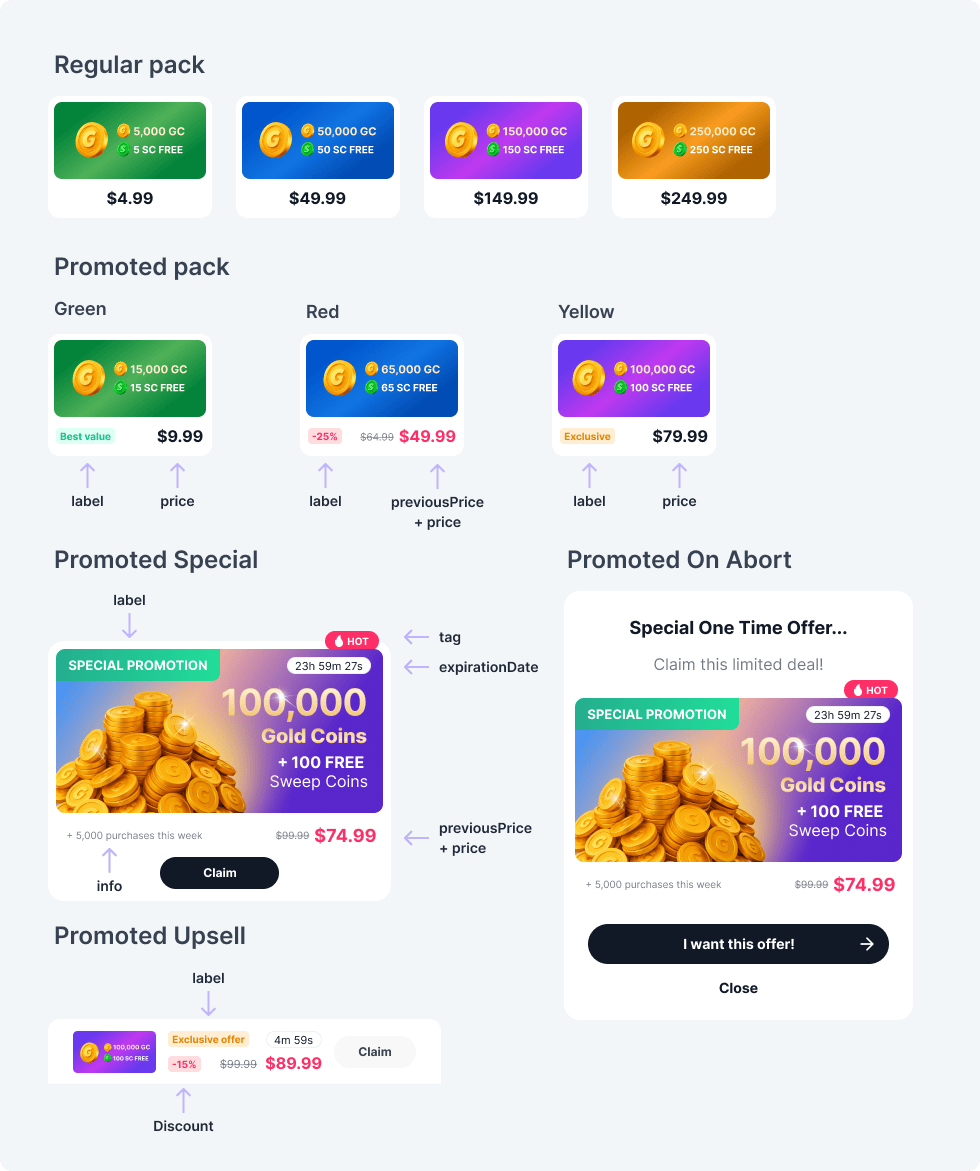
Figure - Anatomy of a Sweepstakes pack
type Pack = {
    version: 2;
    packId: string;
    variant: PackVariant;
    value: {
        price: number;
        previousPrice?: number;
        items: PackItem[]; // the currencies this pack grants (one to many)
    };
    categoryIds?: string[];
    logoUrl: string;
    logoAlt?: string;
    label?: string;
    info?: string;
    tagged?: boolean;
    selected?: boolean;
    expirationDate?: string; // ISO 8601
    discount?: string;
    /**
     * @deprecated No longer has any visual effect and is ignored by the widget.
     * The current price is rendered in the accent (red) colour automatically whenever
     * `value.previousPrice` is set.
     */
    priceHighlighted?: boolean;
};

type PackItem = {
    currencyId: string; // references VirtualCurrency.id
    amount: number;
};

type Category = {
    id: string;
    name: string;
};

type PackSet = {
    version: 2;
    categories?: Category[];
    regular: Pack[];
    promoted: Pack[];
    promotedSpecial?: Pack;
    promotedUpsell?: Pack;
    promotedOnAbort?: Pack;
};
The structure containing sample data (type PackSet) is as follows:
const packs = {
    version: 2,
    categories: [
        { id: "starter", name: "Starter" },
        { id: "premium", name: "Premium" },
    ],
    regular: [
        {
            version: 2,
            packId: "pack-regular-01",
            logoUrl: "assets/images/sweepstakes/pack-4.99.png",
            variant: "regular",
            categoryIds: ["starter"],
            value: {
                price: 4.99,
                items: [
                    { currencyId: "gc", amount: 5000 },
                    { currencyId: "sc", amount: 5 },
                ],
            },
        },
        {
            version: 2,
            packId: "pack-regular-02",
            logoUrl: "assets/images/sweepstakes/pack-9.99.png",
            variant: "regular",
            categoryIds: ["starter"],
            value: {
                price: 9.99,
                items: [
                    { currencyId: "gc", amount: 10000 },
                    { currencyId: "sc", amount: 10 },
                ],
            },
        },
    ],
    promoted: [
        {
            version: 2,
            packId: "pack-red-01",
            logoUrl: "assets/images/sweepstakes/pack-red.png",
            variant: "red", // colour of the badge, purely visual
            label: "-25%", // text shown on the badge
            categoryIds: ["starter"],
            value: {
                price: 49.99,
                previousPrice: 64.99, // when set, the current price is auto-rendered in the accent (red) colour
                items: [
                    { currencyId: "gc", amount: 65000 },
                    { currencyId: "sc", amount: 65 },
                ],
            },
        },
        {
            version: 2,
            packId: "pack-yellow-01",
            logoUrl: "assets/images/sweepstakes/pack-yellow.png",
            variant: "yellow",
            label: "Exclusive",
            categoryIds: ["premium"],
            tagged: true,
            value: {
                price: 79.99,
                items: [
                    { currencyId: "gc", amount: 100000 },
                    { currencyId: "sc", amount: 100 },
                ],
            },
        },
        {
            version: 2,
            packId: "pack-green-01",
            logoUrl: "assets/images/sweepstakes/pack-green.png",
            variant: "green",
            label: "Best value",
            categoryIds: ["premium"],
            value: {
                price: 9.99,
                items: [
                    { currencyId: "gc", amount: 15000 },
                    { currencyId: "sc", amount: 15 },
                ],
            },
        },
    ],
    promotedSpecial: {
        version: 2,
        packId: "pack-promotion-01",
        logoUrl: "assets/images/sweepstakes/special-promotion.png",
        variant: "promotion",
        label: "Special promotion",
        info: "+ 5,000 purchases this week",
        expirationDate: "2026-12-31T23:59:59Z",
        value: {
            price: 74.99,
            previousPrice: 99.99, // previousPrice already paints the price in the accent colour
            items: [
                { currencyId: "gc", amount: 10000 },
                { currencyId: "sc", amount: 5 },
            ],
        },
    },
    promotedUpsell: {
        version: 2,
        packId: "pack-promotion-upsell-01",
        logoUrl: "assets/images/sweepstakes/upsell-promotion.png",
        variant: "promotion",
        label: "Exclusive Offer",
        expirationDate: "2026-12-31T23:59:59Z",
        discount: "-15%", // the only place the `discount` field is rendered: as a second red badge next to `label`
        value: {
            price: 89.99,
            previousPrice: 99.99,
            items: [
                { currencyId: "gc", amount: 10000 },
                { currencyId: "sc", amount: 100 },
            ],
        },
    },
    promotedOnAbort: {
        version: 2,
        packId: "pack-promotion-upsell-modal-01",
        logoUrl: "assets/images/sweepstakes/upsell-promotion-modal.png",
        variant: "promotion",
        label: "Special promotion",
        info: "+ 5,000 purchases this week",
        expirationDate: "2026-12-31T23:59:59Z",
        value: {
            price: 89.99,
            previousPrice: 99.99,
            items: [
                { currencyId: "gc", amount: 10000 },
                { currencyId: "sc", amount: 100 },
            ],
        },
    },
};
Figure - Definition of Packs Passed to the Sweepstakes widget (Example)
Packs usage
- regular: packs shown in the pack browsing area, after the promoted packs
- promoted: packs shown first in the pack browsing area
- promotedSpecial: main promotional pack, shown under a "Special pack" heading inside the pack browsing area. Without categories it sits above the pack grid; with categories it sits right after the first category row
- promotedUpsell: pack displayed at the bottom of the payment method selection on First-Time Purchase and on the first step of a Subsequent Purchase
- promotedOnAbort: if available, displayed in a modal when the user closes the wallet during the purchase journey
The same pack browsing experience applies to the first purchase and to subsequent purchases.
Pack categories
Declaring categories on the pack set turns the pack browsing area into category navigation: a swipeable row of pills with one pill per category, next to the fixed Featured pill, plus a Custom amount pill when custom amounts are enabled for your operator. On desktop the pill row shows scroll arrows when it overflows, and it supports keyboard navigation.
- The pill order follows the order of the
categoriesarray. - Featured is the default view. It shows every category as a horizontal row of packs, in pill order.
- Selecting a category pill shows that category's packs as a grid. Every list renders promoted packs first, then regular packs, each preserving its array order.
- A pack may reference several categories through
categoryIdsand appears in each of them. - Packs referencing no category (or only unknown ids) are collected in a trailing Other group, so every pack stays purchasable.
- Categories without packs are hidden.
- Custom amount replaces the pack area with the amount input field.
- The labels of the Featured, Custom amount, and Other pills are configurable through your content configuration.
Without categories, the widget shows a single merged grid of promoted and regular packs behind a Packs / Custom amount switch. When custom amounts are disabled for your operator, the switch is removed and the grid is shown on its own.
The three promotional slots (promotedSpecial, promotedUpsell, promotedOnAbort) are never grouped into a category and ignore categoryIds.
Packs structure
packId(string) - unique identifier of the packvariant(string) -'regular' | 'green' | 'red' | 'yellow' | 'promotion'value(object) - details of the pack:price(number) - price of the pack in FIAT currencypreviousPrice(optional,number) - previous price of the pack in FIAT currency, used to show a price discountitems(array) - the currencies the pack grants; each item is{ currencyId, amount }, wherecurrencyIdreferences aVirtualCurrency.id
categoryIds(optional,string[]) - ids of the categories the pack belongs to (see Pack categories)logoUrl(string) - URL of the pack image*logoAlt(optional,string) - alt text for the pack imagelabel(optional,string) - text shown on the pack badge (for example"Best value"on agreenpack)info(optional,string) - additional info label for the packtagged(optional,boolean) - indicates if the pack should be visually taggedselected(optional,boolean) - indicates if the pack is preselectedexpirationDate(optional,string) - expiration date of the pack in ISO 8601 formatdiscount(optional,string) - discount text, for example"-25%". Used only by the promoted upsell, where it renders as a second red badge alongsidelabel.priceHighlighted(optional,boolean, deprecated) - ignored by the widget; it no longer has any visual effect. The current price is rendered in the accent (red) colour automatically whenevervalue.previousPriceis set. Retained only for backward compatibility.
Backwards compatibility
Two kinds of backward compatibility apply to virtual integrations.
First, the payload contract is versioned. Payloads without a version field are still accepted at runtime, so existing integrations keep working without changes. New integrations should send version: 2. Operators that only need the previous type definitions can stay on the 1.x line of @fluidpayments/types.
When migrating an existing (v1) integration to version: 2, the fields map as follows:
| v1 field | v2 equivalent |
|---|---|
virtual-currencies.depositCurrency | a currency in currencies[], referenced by primaryId |
virtual-currencies.withdrawalCurrency | a currency in currencies[], referenced by secondaryId |
pack value.deposit / value.withdrawal | entries in pack value.items[] ({ currencyId, amount }) |
balance.depositCurrencyBalance | balance.primaryBalance |
balance.withdrawalCurrencyBalance | balance.secondaryBalance |
balance.lockedWithdrawalCurrencyBalance | balance.lockedSecondaryBalance |
In v2 every currency carries a stable id (v1 had none), and primaryId, secondaryId, and each pack item's currencyId reference currencies by that id rather than by code.
Second, within a pack, the label property and the green/red/yellow variant values replace the previous title property and best_value/discount/exclusive variants. Existing integrations that still pass the deprecated names continue to work, Fluid normalizes them at the input boundary, but new integrations should use the new vocabulary, and existing operators are encouraged to migrate.
The normalization layer also preserves two side-effects the deprecated variants used to imply:
- Packs sent with
variant: "exclusive"are mapped to theyellowvariant. They are still auto-assignedpriceHighlighted: true, but that flag is now deprecated and ignored; such packs render the price in the accent colour only when they carry apreviousPrice. - Packs sent with
variant: "discount"that only carry adiscounttext (and nolabel) automatically receivelabel = discountso the pack badge keeps its text after the rendering switch fromdiscounttolabel.
Pack image dimensions
All the images used for the packs have a ratio of 2:1.
The available dimensions are:
regular,promotedandpromotedUpsellpacks: 154px × 77px (308px × 154px for retina)promotedSpecialandpromotedOnAbortpacks: 328px × 164px (656px × 328px for retina)
The retina dimension is recommended, for a sharp display on mobile devices.