Fluid Artificial Intelligence (AI)
Fluid offers two AI-powered features that can be utilized independently or in combination:
- Predictions for Suggested Amounts
- A/B Testing
Any of these features can be enabled from the Settings page in the back office by toggling their respective switches.
Note: Before enabling any of the AI features historical data is required to perform Machine Learning (ML) and/or Data Analytics (DA).
Predictions for Suggested Amounts
This feature predicts and displays tailored deposit amounts, including default and alternative suggestions, based on historical data and customer behavior.
The following parameters are necessary for generating predictions:
- Country (ML and DA)
- Currency (ML and DA)
- Previous Deposit (ML)
In cases where parameters are unavailable or the data volume is insufficient, pre-set default amounts configured in the back office will be used.
AI Model Configuration
When enabled, a dropdown menu for the AI model appears, providing three options:
- Low: Suggested amounts align closely with predictions.
- Medium: Suggested amounts are moderately higher than predictions.
- High: Suggested amounts are significantly higher than predictions.
A/B Testing
This feature facilitates testing of various AI models for Predictions for Suggested Amounts, enabling data-driven decisions on model selection.
Setup
-
Divide the traffic split among the Low, Medium, High or No AI models to see which performs best.
-
To do this, specify the proportions of the desired split between the different models.
- Assign a number for each AI model.
- Use the same values if an equal distribution is desired.
-
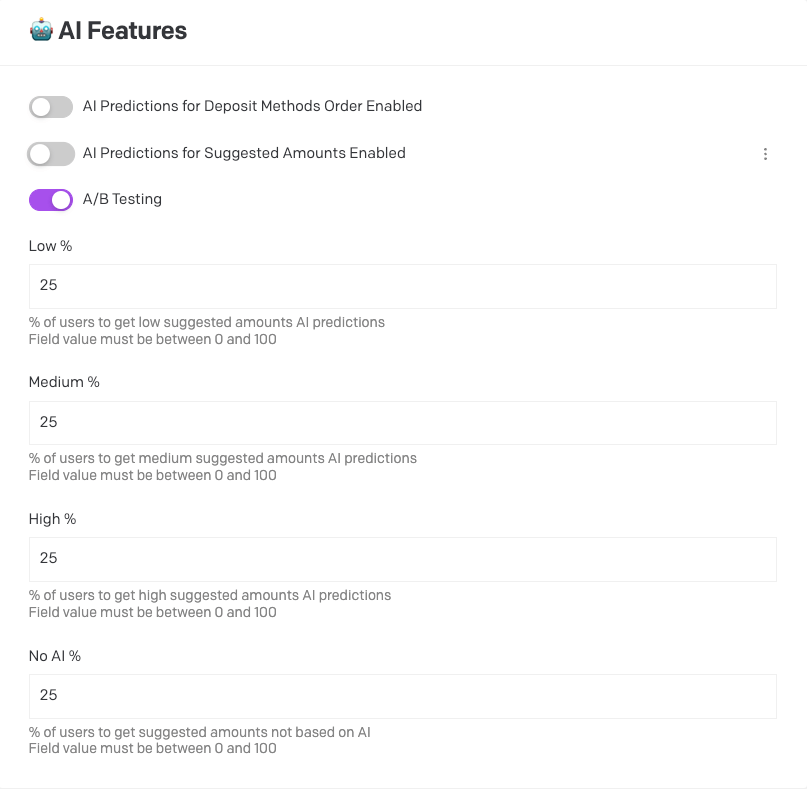
Scenario 1 (using percentages - values add up to 100):
- Low - 25
- Medium - 25
- High - 25
- No AI - 25
-
Scenario 2 (not using percentages):
- Low - 4
- Medium - 6
- High - 5
- No AI - 5
Split Adjustment
Whatever values are specified, Fluid will make the necessary adjustments to calculate the correct proportions to 100% of the traffic.
For instance, using scenario 2 as an example, our system would calculate the sum of the values as 20 and adjust the split for each model as follows:
- Low - 20% (4/20)
- Medium - 30% (6/20)
- High - 25% (5/20)
- No AI - 25% (5/20)
Recommendations
- Percentages should be split evenly between the selected AI models for balanced testing.
- A/B Testing should remain active for at least four weeks without modifications to collect sufficient data for analysis.
Important: Enabling A/B Testing overrides any active Predictions for Suggested Amounts configuration.