

Payment Methods
Each Payment Method record defines a single payment option available to players. Methods are created here, then added to an Operator Payment Methods collection to make them active.
Identity
Section titled “Identity”| Field | Type | Description |
|---|---|---|
Name (name) |
string | Display name shown to the player (e.g. “ApplePay”). Use the locale tabs to give a translated name where it differs by language |
Name (Internal) (name_internal) |
string | Internal identifier used in the Back Office, to tell apart the same method from different providers. Use the format PROVIDERTYPE_SERVICE-OperatorName |
Description (description) |
string | Short description of the payment method |
Payment Type (payment_type) |
string | Category of the method: EWallet, CreditCard, BankTransfer, Crypto, ApplePay or Voucher. CreditCard routes the method to the card form |
Payment Gateway (payment_gateway) |
link | Payment Gateway record this method routes through |
Visual
Section titled “Visual”| Field | Type | Description |
|---|---|---|
Logo (logo) |
file | Logo asset for the method. SVG, 94 x 56 |
Logo Light (logo_light) |
file | Logo variant used on dark-themed backgrounds. SVG, 94 x 56 |
User Content
Section titled “User Content”| Field | Type | Description |
|---|---|---|
Terms and Conditions (terms_and_conditions) |
string | Single line of text holding the method’s T&Cs |
Info (info) |
text | Rich-text content shown alongside the payment method |
Deposit Instructions (Payment method HTML) (instructions) |
text | Optional usage instructions shown to the player on the deposit details screen. Accepts HTML and Markdown |
Withdrawal Instructions (Payment method HTML) (withdrawal_instructions_payment_method_html) |
text | Optional usage instructions shown on the withdrawal details screen. Accepts HTML and Markdown. There is no fallback to the deposit instructions |
Masked account format (masked_account_format) |
string | Format used to mask the stored account identifier (e.g. Default) |
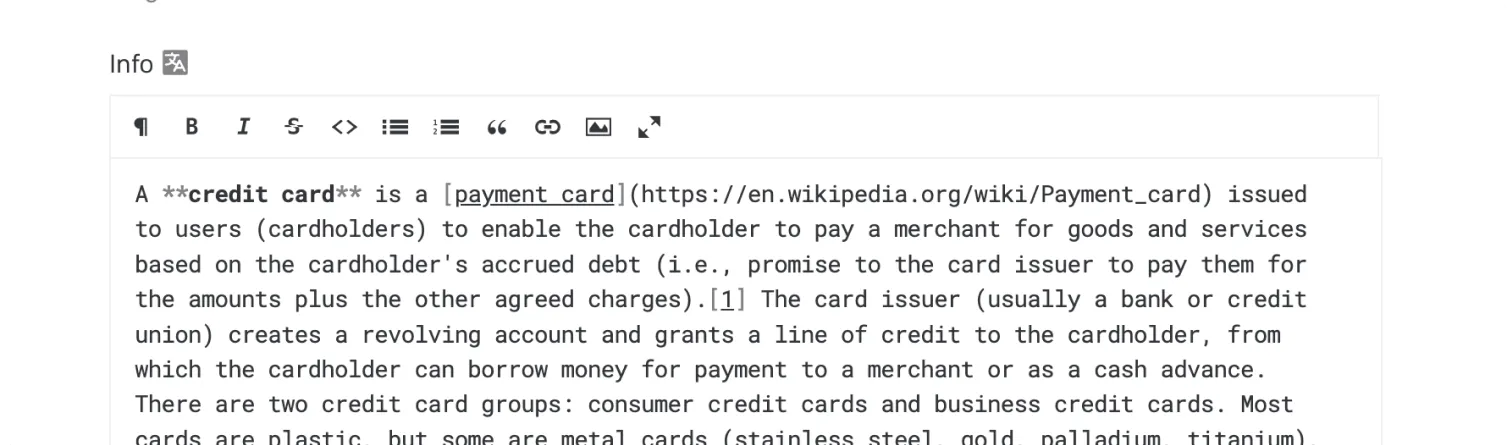 The Info field in DatoCMS
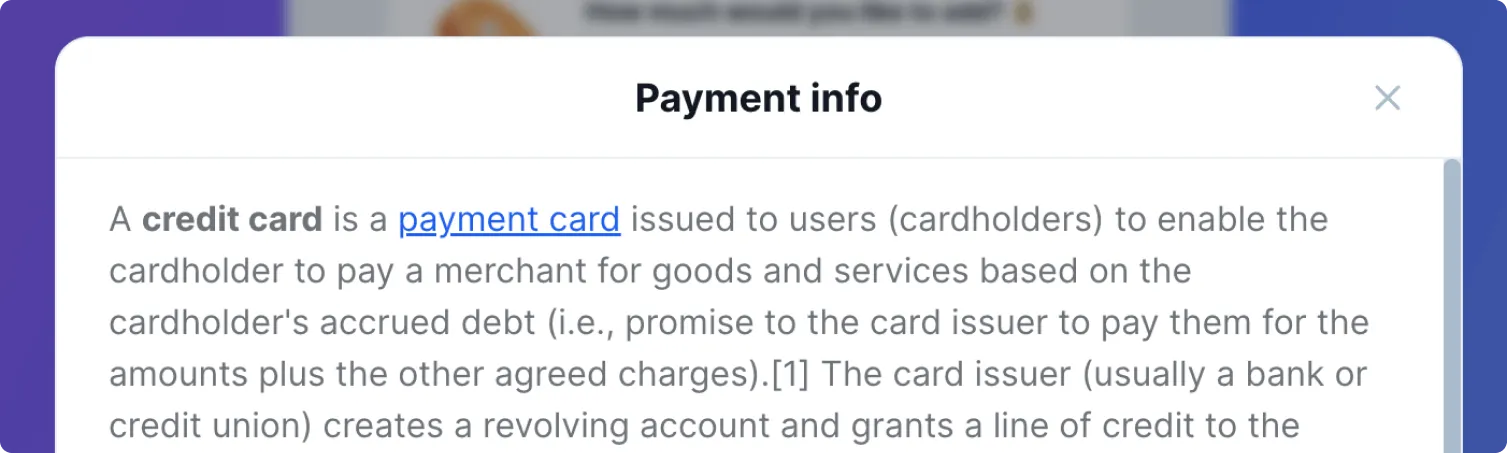 The info shown next to the payment method in the cashier
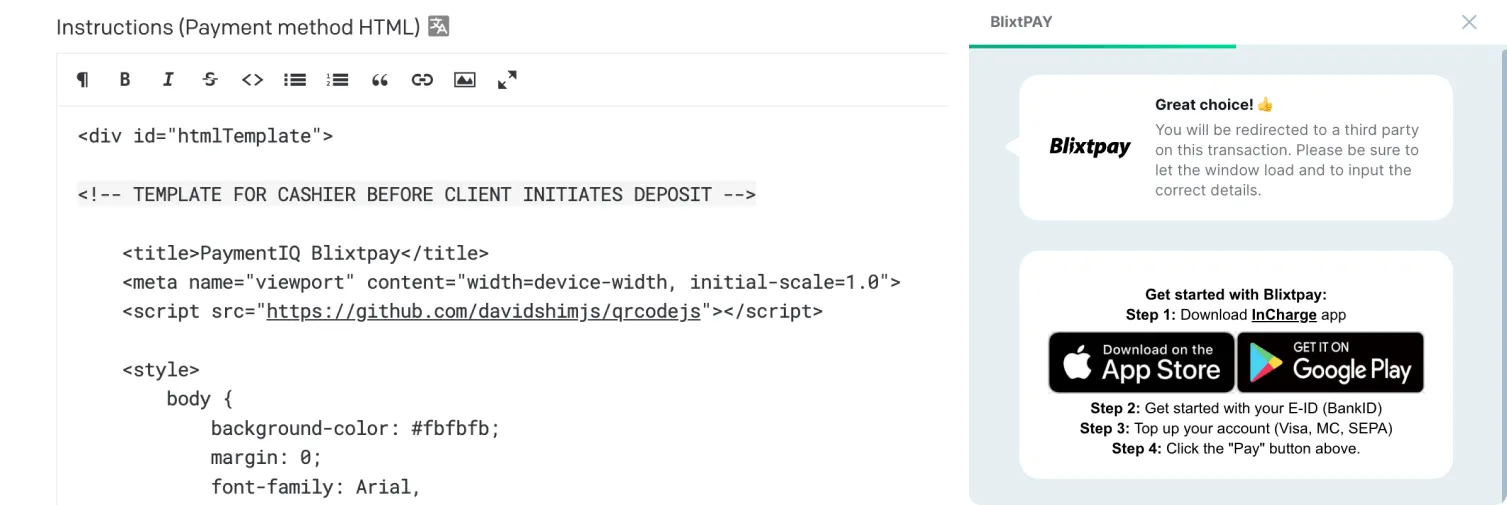 Deposit instructions on the details screen
Payment Limits
Section titled “Payment Limits”| Field | Type | Description |
|---|---|---|
Payment Limits (payment_limits) |
record | Optional per-method limits, with four numeric fields: Min Deposit, Max Deposit, Min Withdrawal and Max Withdrawal. Each is optional; leaving one empty or 0 falls back to Fluid’s global default |
Input Fields
Section titled “Input Fields”| Field | Type | Description |
|---|---|---|
Deposit Input Fields (deposit_input_fields) |
links | Input Field records required when a player makes a deposit with this method |
Withdrawal Input Fields (withdrawal_input_fields) |
links | Input Field records required when a player makes a withdrawal with this method |
Deposit Stored method Input Fields (stored_method_input_fields) |
links | Input fields the player must fill in again when depositing with a method they have already stored. Use it when the provider does not keep every detail of a stored account, for example the coin and network of a stored crypto wallet. Link only the missing fields. When the list is empty, a stored method goes straight to the deposit. |
Withdrawal Stored method Input Fields (withdrawal_stored_method_input_fields) |
links | The same, for withdrawals with a stored method. When the list is empty, a stored method skips the details screen and goes straight to the withdrawal confirmation. |
Gateway Configuration
Section titled “Gateway Configuration”| Field | Type | Description |
|---|---|---|
Payment Method Gateway Parameters (payment_method_gateway_parameters) |
rich_text | Array of Payment Method Parameter records (typically 1 or 2 items) |
Root-level Transaction Attributes (root_level_attributes) |
rich_text | Attributes sent to the Payment Provider at the request root level |
Include Additional Transaction Attributes (include_additional_transaction_attributes) |
boolean | When enabled, additional attributes are included at the Transaction level of the request |
Redirect Behaviour
Section titled “Redirect Behaviour”| Field | Type | Description |
|---|---|---|
Auto-Redirect Type (window_redirect_type) |
string | Redirects the user to the gateway automatically when needed, in the selected container: Popup Window or Browser Tab. Choose the one that matches the method’s configuration at the gateway |
Host-Site Handling
Section titled “Host-Site Handling”| Field | Type | Description |
|---|---|---|
Deposit handled by the host site (handled_by_host_site) |
boolean | When enabled, the host site is notified of deposit details instead of Fluid processing the deposit |
Withdrawal handled by the host site (withdrawal_handled_by_host_site) |
boolean | When enabled, the host site is notified of withdrawal details instead of Fluid processing the withdrawal |
Deposit amounts limited by voucher (deposit_amounts_limited_by_voucher) |
boolean | When enabled, deposit amounts are constrained by an applied voucher |
Apple Pay
Section titled “Apple Pay”| Field | Type | Description |
|---|---|---|
Merchant capabilities (apple_pay_merchant_capabilities) |
string | Comma-separated merchant capabilities. supports3DS is added automatically |
Merchant identifier (apple_pay_merchant_identifier) |
string | Apple Merchant Identifier from your Apple Developer account |
Supported networks (apple_pay_supported_networks) |
string | Supported Apple Pay networks (comma-separated) |
Hosted Fields
Section titled “Hosted Fields”For PCI DSS scope reduction, credit-card inputs can be rendered inside iframes hosted by the payment gateway instead of native inputs on the operator’s site. The raw card data then never enters the operator’s browser context; only encrypted tokens cross back to the widget.
- The Creditcard Hosted Fields toggle (
hosted_fields_enabled) is on the operator’s payment gateway entry in Operator Config, not on individual payment methods. - When on, every credit-card method routed through that gateway renders as hosted-field iframes, provided the gateway has a hosted-fields address (set by Fluid per gateway and environment).
- When off, the widget uses the regular client-side encrypted form (or plain inputs if the gateway has no encryption) for every credit-card method on that gateway.
- The setting is per operator and per gateway: an operator can use hosted fields for cards on one gateway and the regular form on another.
- Only credit-card methods are affected. E-wallets, bank transfers, crypto and other types ignore the toggle.
For the player, the form looks the same. Validation feedback (errors, card brand icon) first appears when they leave a field; once an error shows, it updates live as they correct the input. The cardholder name input also moves into an iframe for consistency, although the name isn’t encrypted.
Switching the toggle off and saving reverts every credit-card method on that gateway to the regular form on the next request, with no widget redeploy.
Methods where the gateway collects the card
Section titled “Methods where the gateway collects the card”Hosted Fields covers fields Fluid serves. A few gateways instead collect the card in their own inputs, embedded in the cashier’s normal card form: the player sees the usual card step, but the number, expiry and CVV belong to the gateway and the card details never reach Fluid.
Unlike a method that pays on the gateway’s own page, this one must have its Payment Type set to CreditCard, which is what routes it to the card step. The two arrangements need opposite settings, so check which one a method is meant to use before changing it. Nothing else needs configuring per method, and in particular leave the Creditcard Hosted Fields toggle alone: it covers fields Fluid serves, and turning it off does not turn these off.
Fluid sets the address those inputs load from, per gateway and environment. A method whose gateway has no usable address disappears from the cashier rather than falling back to the gateway’s own payment page. The gateway’s other methods are unaffected. If a card method is missing from the cashier, that address is the first thing to check.
What changes for the player:
- The card step looks like the regular one. The brand icon, the field placeholders and their translations still come from Fluid.
- Theme settings only partly reach these inputs. Colours, text size, placeholder copy and the font family are passed through; the corner radius is not, because the gateway offers only a few fixed corner styles. A font family the gateway can’t resolve falls back to its own without warning.
- The three inputs may sit on two rows, number on the first and expiry and CVV on the second. The gateway decides this from the width available; neither the theme nor the Back Office controls it.
- Validation appears as the player types, and the card brand is detected the same way.
Cards the gateway already holds
Section titled “Cards the gateway already holds”The gateway also remembers the cards a player has paid with before. They appear in the cashier as stored methods alongside the player’s other saved methods, with no extra configuration. How much of the card number is shown follows the method’s Masked account format.
- The player is asked for their CVV again, in a field beside the stored card. That’s the gateway’s requirement for charging a card it holds, and it can’t be switched off.
- Expired cards are not shown. A card stays on offer until the end of its expiry month.
- Cards are for purchases only. A stored card is never offered for a withdrawal; withdrawals on these brands are paid out by bank transfer.
- Stored cards can be absent without anything being wrong: on a first payment, while the gateway is briefly unreachable, or before the brand is set up to read them. The cashier then offers the normal card step. Stored cards are kept per brand, so a player won’t see cards from another brand.
Methods that pay on the gateway’s own page
Section titled “Methods that pay on the gateway’s own page”Some gateways collect the payment on a page they host themselves. The player picks the method in the cashier, and the payment step is the gateway’s page shown inside the cashier. Nothing is typed into a Fluid form, so there are no card inputs, no encryption and no hosted fields involved. Three settings decide whether such a method works.
Payment Type must not be CreditCard
Section titled “Payment Type must not be CreditCard”Set the method’s Payment Type to EWallet, even when the page it opens accepts cards. CreditCard tells the widget to prepare an encrypted card form and fetch the gateway’s encryption key first, which a gateway that collects the card on its own page doesn’t have, so the payment step fails before it opens. The method’s name and logo can still say “Card”.
Payment Method Gateway Parameters must match
Section titled “Payment Method Gateway Parameters must match”Gateways that publish a list of their available methods are matched automatically. A gateway with no such list, because its methods are fixed, announces a single method under a known parameter, and the record has to declare the same parameter and value, or the method never appears in the cashier. Fluid sets that value per gateway; ask if you’re unsure which applies.
Transaction Status Check tells the cashier when the payment finished
Section titled “Transaction Status Check tells the cashier when the payment finished”On the operator’s payment gateway entry in Operator Config:
| Setting | Value |
|---|---|
| Transaction Status Check Enabled | On |
| Transaction Status Check Source | Fluid |
| Transaction Status URL | Not used with the Fluid source; leave it as it is |
| Transaction Status Check Interval | Seconds between checks (3 is a good default) |
Source decides who the cashier asks for the result. Fluid is right here: these gateways report the outcome to Fluid privately, so the cashier has to ask Fluid. Gateway is for gateways like PaymentIQ that publish a status page the cashier can poll directly; in that mode the URL is required, and leaving it blank turns status checking off for every method on the gateway.
If status checking is off, the payment still completes and the player is still credited, but the cashier never finds out: it stays on the pending screen until the player closes it.
Withdrawal methods on a brand whose platform approves payouts
Section titled “Withdrawal methods on a brand whose platform approves payouts”On some brands a withdrawal is not sent straight out. The platform that owns the player’s account holds the request until someone approves it, which can take days, and only then pays it out. The player sees it as pending in the cashier and can cancel it while it waits.
To set up a method:
- Add a Payment Method Gateway Parameter named
paymentId, set to the identifier Fluid provides for that method on the brand. - Add the method to the operator’s active list in Operator Payment Methods. The cashier only lists a method that the platform offers and the operator has active.
Good to know:
- Without
paymentId, the withdrawal is refused before it reaches the platform. A wrong value isn’t caught: the platform refuses it and the player sees a generic failure. - To withhold a method, leave it out of the operator’s active list. Don’t edit or delete the record, which other operators share.
- Where card payouts aren’t available, keep card withdrawal methods out of the active list, or the player can pick one that will always be refused.
- Withdrawal limits come from the platform and override the record and operator settings.
- Refused withdrawals arrive with their own error codes; see Codes for a refused withdrawal.