

Data Objects
Fluid widgets accept structured data as stringified JSON attributes. These types are available in the @fluidpayments/types npm package.
Availability by widget
Section titled “Availability by widget”| Object | Widget | Quick Deposit | Virtual |
|---|---|---|---|
| User Data | Yes | Yes | Yes |
| Bonus Data | Yes | Yes | — |
| Virtual Currencies & Balance | — | — | Yes |
| Packs | — | — | Yes |
User Data
Section titled “User Data”Used for resolving AI-suggested Deposit Amounts via machine learning.
type FluidUserData = { age?: number; affiliateId?: string; depositCount?: number; daysSinceRegistration?: number; fullName?: string; kycStatus?: FluidKycStatus; // 'verified' | 'unverified' | 'processing' lifetimeDeposit?: number; previousDeposit?: number; tags?: string[];};All properties are optional. Pass as a stringified JSON attribute:
widget.setAttribute('user-data', JSON.stringify({ age: 30, depositCount: 5, fullName: 'John Doe', kycStatus: 'verified', lifetimeDeposit: 500, previousDeposit: 100, tags: ['vip']}));Bonus Data
Section titled “Bonus Data”const bonusData = [{ code: "DepositBonus", title: "Deposit Bonus", description: "100% up to 200 EUR + 10 Mega Spins", logoUrl: "https://example.com/bonus-img.png", maxBonus: 200, maxBonusPercentage: 150, minDeposit: 10, maxDeposit: 250, minDepositCount: 2, maxDepositCount: 10, minDaysSinceRegistration: 25, maxDaysSinceRegistration: 180, selected: true, termsAndConditions: "<p>Welcome Offer T&Cs...</p>", success: { description: "Your bonus has been added to your account." }, paymentMethodFilter: { applyTo: [ { providerType: "CREDITCARD" }, { providerType: "WEBREDIRECT", service: "BLIXTPAY" } ] }}];
widget.setAttribute('bonuses', JSON.stringify(bonusData));Key bonus properties
Section titled “Key bonus properties”| Property | Description |
|---|---|
code |
Bonus code identifier. Required |
title / description |
Display text. Both required |
logoUrl |
Bonus image (84x84px, 168x168px retina). If it’s absent or can’t be loaded (for example a 404), the bonus image placeholder set in the Theme is shown instead |
maxBonus |
Maximum claimable bonus amount |
maxBonusPercentage |
Percentage of deposit amount (e.g. 150 = 150%). Requires maxBonus |
minDeposit / maxDeposit |
Optional deposit amount boundaries |
minDepositCount / maxDepositCount |
Optional range for the user’s number of past deposits, checked against depositCount in User Data |
minDaysSinceRegistration / maxDaysSinceRegistration |
Optional range for the days since the user registered, checked against daysSinceRegistration in User Data |
selected |
Pre-selects the bonus. Set it on one bonus only — see Preselecting a bonus |
variant |
Optional. "abandon" or "regularAndAbandon" offers the bonus in the modal shown when the user tries to leave — see Deposit Abandon Modal |
termsAndConditions |
HTML string |
paymentMethodFilter |
Controls which methods receive the bonus — see Payment method filter |
success.description |
Custom message shown on the deposit success screen in place of the bonus title and description. When omitted, the success screen shows the title and description. Fluid Cashier only: the inline Quick Deposit success screen doesn’t show it |
A bonus that sets minDepositCount or maxDepositCount is only offered when user-data includes depositCount; the same goes for the registration range and daysSinceRegistration.
A bonus that fails validation (for example a missing code, title or description) is left out of the list, and a fluid-error event reports why.
Payment method filter
Section titled “Payment method filter”Without a paymentMethodFilter, the bonus is available with every payment method. With one, set either of these lists (not both — a bonus that sets both is invalid and left out):
applyTo: the bonus applies only to the listed payment methods.excludeFrom: the bonus applies to every payment method except the listed ones.
Each entry names a method by providerType and, when the method has one, its service. providerType on its own is enough for a method without a service. Write both values exactly as they appear in the payment provider configuration.
Bonus amount calculation
Section titled “Bonus amount calculation”maxBonusPercentage multiplies the deposited amount. Example: 150% of €50 = €75 bonus (capped at maxBonus). If maxBonus exists without maxBonusPercentage, 100% is assumed.
Preselecting a bonus
Section titled “Preselecting a bonus”Set selected: true on a single bonus in the array to pre-select it for the user, for example when the user arrives from a specific bonus offer. The preselected bonus must be part of the bonuses array. If several bonuses are marked selected, only the first one is preselected.
bonuses is an observed attribute, so you can change the preselection after the wallet has loaded by setting the attribute again.
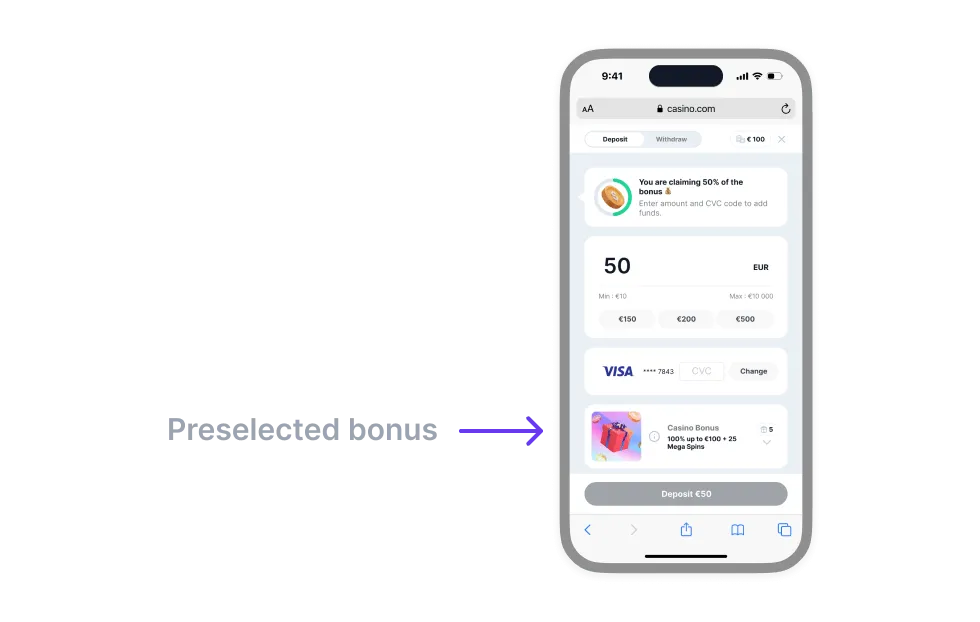 Example of a preselected bonus
Virtual Currencies (Virtual only)
Section titled “Virtual Currencies (Virtual only)”The virtual-currencies attribute lists the virtual currencies the user holds, as a stringified VirtualCurrencies object:
type VirtualCurrencies = {  version: 2;  currencies: VirtualCurrency[]; // every currency, including the primary and secondary  primaryId: string;  secondaryId: string;};
type VirtualCurrency = { id: string; name: string; code: string; symbol: string; exchangeRateToFiatCurrency?: number; icon?: string; conversionOffset?: number;};| Field | Description |
|---|---|
primaryId |
id of the currency the user plays with (e.g. Gold Coins) |
secondaryId |
id of the redeemable currency (e.g. Sweeps Coins) |
id |
Stable identifier used to reference the currency from primaryId, secondaryId and pack items. Never shown to users, and must be unique |
name |
Currency name, e.g. "Gold Coins" |
code |
Display ticker, e.g. "GC" |
symbol |
Currency symbol, also used as the icon’s alt text |
exchangeRateToFiatCurrency |
Units of this currency per one unit of the FIAT currency, used to convert custom amounts. Required for the primary and secondary currencies, optional for any extra currencies in the catalogue |
icon |
URL of the currency icon. If omitted, the primary and secondary currencies fall back to the Sweepstakes currency icons set in the Theme |
conversionOffset |
Amount added to the result when a FIAT amount is converted into this currency |
If primaryId or secondaryId doesn’t match a currency id, two currencies share an id, or the primary or secondary currency has no exchangeRateToFiatCurrency, the widget emits invalid-init-attributes.
Virtual Balance (Virtual only)
Section titled “Virtual Balance (Virtual only)”The balance attribute carries the user’s current balances, as a stringified VirtualBalance object (not a plain number as on <fluid-widget>):
type VirtualBalance = { version: 2; primaryBalance: number; secondaryBalance: number; lockedSecondaryBalance?: number;};Packs (Virtual only)
Section titled “Packs (Virtual only)”Packs render from two pools (regular, promoted) and three promotional slots (special, upsell, abort). The regular and promoted pools together form the pack browsing area, with promoted packs listed first. The browsing experience is the same for the first purchase and for later ones.
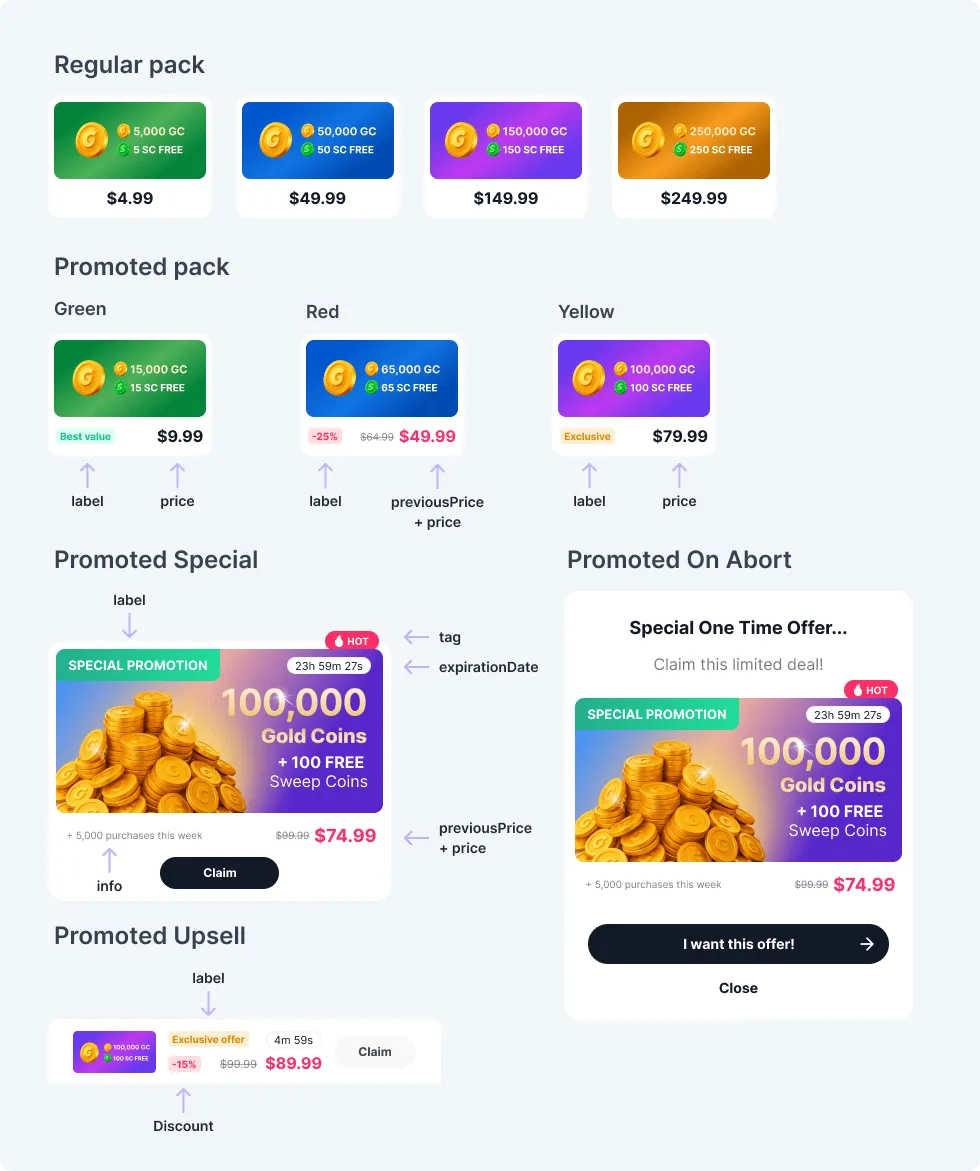 Anatomy of a Sweepstakes pack
type PackSet = {  version: 2;  categories?: Category[];  regular: Pack[];  promoted: Pack[];  promotedSpecial?: Pack;  promotedUpsell?: Pack;  promotedOnAbort?: Pack;};
type Pack = {  version: 2;  packId: string;  variant: 'regular' | 'green' | 'red' | 'yellow' | 'promotion';  value: {    price: number;    previousPrice?: number; // when set, the current price is shown in the accent colour    items: { currencyId: string; amount: number }[];  };  categoryIds?: string[];  logoUrl: string;  logoAlt?: string;  label?: string;  info?: string;  tagged?: boolean;  selected?: boolean;  expirationDate?: string;  discount?: string;};
type Category = { id: string; name: string; selected?: boolean };
Pack fields
Section titled “Pack fields”| Field | Description |
|---|---|
packId |
Unique identifier of the pack |
variant |
'regular' | 'green' | 'red' | 'yellow' | 'promotion'. Sets only the badge colour — see How packs are displayed |
value.price |
Price of the pack in the FIAT currency |
value.previousPrice |
Optional previous price in FIAT, shown struck through to signal a discount |
value.items |
The currencies the pack grants, one or more { currencyId, amount } entries. currencyId references a VirtualCurrency id |
categoryIds |
Optional ids of the categories the pack belongs to — see Pack categories |
logoUrl |
URL of the pack image — see Pack image dimensions |
logoAlt |
Optional alt text for the pack image |
label |
Optional badge text, e.g. "Best value" on a green pack |
info |
Optional additional info line, e.g. "+ 5,000 purchases this week" |
tagged |
Optional. When true, the pack carries a “Hot” tag |
selected |
Optional. Preselects the pack when the purchase flow opens. Has no effect on promotedOnAbort, or when the cashier opens to Quick Buy |
expirationDate |
Optional expiry date in ISO 8601 format. The special and upsell packs are hidden once it has passed |
discount |
Optional discount text, e.g. "-15%". Used only by promotedUpsell |
A pack whose items reference an unknown currency id, or that has no items, makes the whole pack set invalid: the widget shows no packs and emits invalid-init-attributes. The deprecated priceHighlighted field is still accepted but ignored.
How packs are displayed
Section titled “How packs are displayed”variantonly sets the badge colour. The badge text comes fromlabel; on regular and promoted packs the badge appears only forgreen,redandyellowpacks that have alabel.previousPricepaints the current price in the accent (red) colour automatically.discountis rendered only by the promoted upsell, as a second red badge next tolabel.taggedadds a “Hot” tag to draw attention to the pack.
Pack pools
Section titled “Pack pools”| Pool | Purpose |
|---|---|
regular |
Shown after promoted packs in the browsing area |
promoted |
Shown first in the browsing area |
promotedSpecial |
Main promotional pack under a “Special pack” heading in the browsing area. Without categories it sits above the pack grid; with categories, right after the first category row |
promotedUpsell |
Shown at the bottom of the payment method selection on a first-time purchase, and on the first step of a subsequent purchase. It appears only when it costs more than the pack the user has picked |
promotedOnAbort |
Modal pack shown when the user closes the wallet during the purchase journey |
The three promotional slots and categories are optional: leave out the ones you don’t want to show.
Example pack set
Section titled “Example pack set”const packs = { version: 2, categories: [ { id: 'starter', name: 'Starter' }, { id: 'premium', name: 'Premium' } ], regular: [ { version: 2, packId: 'pack-regular-01', logoUrl: 'https://example.com/packs/pack-4.99.png', variant: 'regular', categoryIds: ['starter'], value: { price: 4.99, items: [ { currencyId: 'gc', amount: 5000 }, { currencyId: 'sc', amount: 5 } ] } }, { version: 2, packId: 'pack-regular-02', logoUrl: 'https://example.com/packs/pack-9.99.png', variant: 'regular', categoryIds: ['starter'], value: { price: 9.99, items: [ { currencyId: 'gc', amount: 10000 }, { currencyId: 'sc', amount: 10 } ] } } ], promoted: [ { version: 2, packId: 'pack-red-01', logoUrl: 'https://example.com/packs/pack-red.png', variant: 'red', // badge colour only label: '-25%', // badge text categoryIds: ['starter'], value: { price: 49.99, previousPrice: 64.99, // paints the current price in the accent colour items: [ { currencyId: 'gc', amount: 65000 }, { currencyId: 'sc', amount: 65 } ] } }, { version: 2, packId: 'pack-yellow-01', logoUrl: 'https://example.com/packs/pack-yellow.png', variant: 'yellow', label: 'Exclusive', categoryIds: ['premium'], tagged: true, value: { price: 79.99, items: [ { currencyId: 'gc', amount: 100000 }, { currencyId: 'sc', amount: 100 } ] } }, { version: 2, packId: 'pack-green-01', logoUrl: 'https://example.com/packs/pack-green.png', variant: 'green', label: 'Best value', categoryIds: ['premium'], value: { price: 9.99, items: [ { currencyId: 'gc', amount: 15000 }, { currencyId: 'sc', amount: 15 } ] } } ], promotedSpecial: { version: 2, packId: 'pack-promotion-01', logoUrl: 'https://example.com/packs/special-promotion.png', variant: 'promotion', label: 'Special promotion', info: '+ 5,000 purchases this week', expirationDate: '2026-12-31T23:59:59Z', value: { price: 74.99, previousPrice: 99.99, items: [ { currencyId: 'gc', amount: 10000 }, { currencyId: 'sc', amount: 5 } ] } }, promotedUpsell: { version: 2, packId: 'pack-promotion-upsell-01', logoUrl: 'https://example.com/packs/upsell-promotion.png', variant: 'promotion', label: 'Exclusive Offer', expirationDate: '2026-12-31T23:59:59Z', discount: '-15%', // rendered only here, as a second red badge next to label value: { price: 89.99, previousPrice: 99.99, items: [ { currencyId: 'gc', amount: 10000 }, { currencyId: 'sc', amount: 100 } ] } }, promotedOnAbort: { version: 2, packId: 'pack-promotion-abort-01', logoUrl: 'https://example.com/packs/abort-promotion.png', variant: 'promotion', label: 'Special promotion', info: '+ 5,000 purchases this week', expirationDate: '2026-12-31T23:59:59Z', value: { price: 89.99, previousPrice: 99.99, items: [ { currencyId: 'gc', amount: 10000 }, { currencyId: 'sc', amount: 100 } ] } }};
virtual.setAttribute('packs', JSON.stringify(packs));Pack image dimensions (2:1 ratio)
Section titled “Pack image dimensions (2:1 ratio)”| Type | Standard | Retina |
|---|---|---|
| Regular, promoted, upsell | 154x77px | 308x154px |
| Special, abort | 328x164px | 656x328px |
The retina size is recommended for a sharp display on mobile devices.
Pack categories
Section titled “Pack categories”Declaring categories turns the browsing area into category navigation: a swipeable row of pills, starting with a fixed Featured pill, then a Custom amount pill when custom amounts are enabled for your operator, then one pill per category. When the row overflows, scroll arrows appear, and the pills can be navigated with the keyboard.
- Category pills follow the order of the
categoriesarray. - Featured is the default view: it shows every category as a horizontal row of packs, in pill order.
- Selecting a category pill shows that category’s packs as a grid. Every list shows promoted packs first, then regular packs, each in array order.
- A pack can list several categories in
categoryIdsand appears in each of them. - Packs with no
categoryIds, or only unknown ids, are collected in a trailing Other group, so every pack stays purchasable. - Categories without packs are hidden.
- Custom amount replaces the pack area with the amount input field.
- The Featured, Custom amount and Other labels are configurable in your content set.
Without categories, the widget shows a single grid of promoted and regular packs behind a Packs / Custom amount switch. When custom amounts are disabled for your operator, the switch is removed and the grid is shown on its own.
The three promotional slots (promotedSpecial, promotedUpsell, promotedOnAbort) are never grouped into a category and ignore categoryIds.
Preselecting a category
Section titled “Preselecting a category”Set selected: true on an entry of categories to open the cashier on that category instead of Featured, for example when the player opens the cashier from a specific currency on your site. No pack is selected, so the player still picks one from the category.
- Only the first category marked
selectedis used. - If that category is unknown or has no packs, the cashier opens on Featured.
- A pack marked
selectedtakes precedence: the cashier preselects that pack and ignores the category. - The preselection applies when the purchase step opens. Set it on the
packsattribute before opening the cashier. - Opening the cashier to Quick Buy (
transaction="quick-deposit") ignores the preselection, as it does for a preselected pack.
Backwards compatibility
Section titled “Backwards compatibility”The virtual-currencies, balance and packs payloads are versioned. Payloads without a version field are read as the v1 shape, so existing integrations keep working unchanged; new integrations should send version: 2. A virtual-currencies payload in the v2 shape that leaves out version: 2 is rejected. If you only need the previous type definitions, stay on the 1.x line of the @fluidpayments/types package.
When migrating a v1 integration to version: 2, the fields map as follows:
| v1 field | v2 equivalent |
|---|---|
virtual-currencies.depositCurrency |
A currency in currencies[], referenced by primaryId |
virtual-currencies.withdrawalCurrency |
A currency in currencies[], referenced by secondaryId |
Pack value.deposit / value.withdrawal |
Entries in pack value.items[] ({ currencyId, amount }) |
balance.depositCurrencyBalance |
balance.primaryBalance |
balance.withdrawalCurrencyBalance |
balance.secondaryBalance |
balance.lockedWithdrawalCurrencyBalance |
balance.lockedSecondaryBalance |
In v2 every currency has a stable id (v1 had none), and primaryId, secondaryId and each pack item’s currencyId reference currencies by that id, not by code.
Within a pack, label replaces the previous title property, and the green, red and yellow variants replace best_value, discount and exclusive. Packs that still use the old names keep working, because Fluid converts them on input, but new integrations should use the new names. The conversion keeps two side effects of the old variants:
exclusivepacks becomeyellow. They still getpriceHighlighted: true, but that flag is now ignored, so the price is shown in the accent colour only when the pack has apreviousPrice.discountpacks that carry adiscounttext but nolabelgetlabelset to thediscounttext, so the badge keeps its text.
Init Parameters
Section titled “Init Parameters”Unlike the objects above, this one isn’t passed as an attribute: it’s the argument to fluid.init() for Programmatic initialisation.
type FluidInitParams = { operatorId: number; userId: string; sessionId: string; locale: string; countryCode: string; currencyCode: string; bonuses?: FluidBonusData; userData?: FluidUserData;};The fields match the identity attributes, with three differences: operatorId is a number, and the country and currency are countryCode and currencyCode. bonuses takes the same data as the bonuses attribute (see Bonus Data), and userData a FluidUserData object — both as objects, not stringified JSON.