

AI-suggested Deposit Amounts
The AI-suggested Deposit Amounts feature predicts and displays tailored deposit amounts, including the default amount and alternative suggestions, based on historical data and the user’s behaviour. It is enabled per operator in the Back Office Settings.
What the predictions need
Section titled “What the predictions need”| Data | Where it comes from |
|---|---|
| Country | The country attribute |
| Currency | The currency attribute |
| Previous deposit | previousDeposit in the user-data attribute |
If any of these is missing, or there isn’t enough data, the cashier falls back to the predefined amounts configured in the Back Office.
widget.setAttribute('user-data', JSON.stringify({ previousDeposit: 100, age: 30}));AI model
Section titled “AI model”When the feature is enabled, the AI model option sets how the suggested amounts relate to the predictions:
| Option | Suggested amounts |
|---|---|
| Low | Align closely with the predictions |
| Medium | Moderately higher than the predictions |
| High | Significantly higher than the predictions |
A/B testing
Section titled “A/B testing”A/B testing compares the AI models by splitting players between them. It overrides the Predictions for Suggested Amounts setting while enabled.
Give each model a share of the traffic: Low, Medium, High and No AI. The values don’t need to add up to 100; Fluid converts them into proportions. For example, Low 4, Medium 6, High 5 and No AI 5 add up to 20, which gives 20%, 30%, 25% and 25% of players.
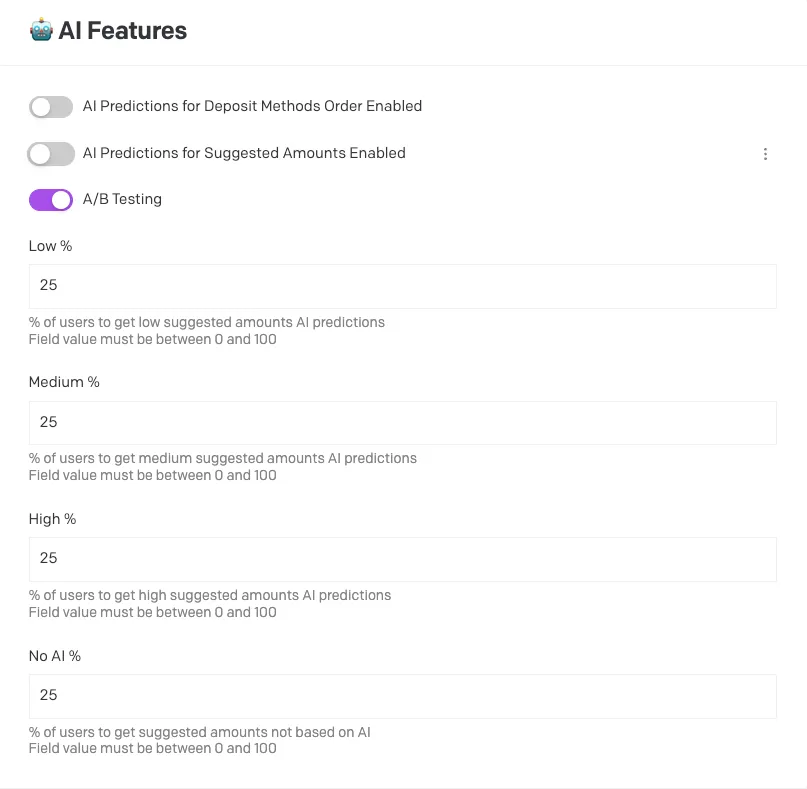 Setting the A/B testing traffic split in the Back Office
For a balanced test, split the traffic evenly between the models you compare, and leave the test running unchanged for at least four weeks to collect enough data.