

Settings
The Settings record controls feature flags, display options, and behavioural toggles for an operator. It is linked from the Operator Config and affects how the cashier behaves and appears to players.
Identity
Section titled “Identity”| Field | Type | Description |
|---|---|---|
Name (name) |
string | Unique display name (e.g. “Cashin”) |
Display and UI
Section titled “Display and UI”| Field | Type | Description |
|---|---|---|
Balance Displayed (balance_displayed) |
boolean | When enabled, the player’s balance is displayed |
Transaction Toggle Displayed (transaction_toggle_displayed) |
boolean | When enabled, the deposit/withdraw transaction toggle is displayed |
Bonus Outline (bonus_outlined) |
boolean | Adds an outline to selected bonuses for visibility |
Wallet Position (integration) |
string | How the wallet is shown: drawer on the left (LEFT), centred (CENTER), drawer on the right (RIGHT) or embedded in the page (INLINE). See Wallet Position |
Contact Support enabled (contact_support_enabled) |
boolean | When enabled, a Contact Us button is shown when a transaction fails. See Contact Support |
Contact Support link (contact_support_link) |
string | Optional link opened by the Contact Us button (e.g. mailto:[email protected]) |
Campaign (campaign) |
link | The campaign to run for this operator |
Campaign active until (campaign_active_until) |
date_time | When the campaign ends; empty means no end date |
Payment behaviour
Section titled “Payment behaviour”| Field | Type | Description |
|---|---|---|
Player Fees Hidden (hidden_player_fees_enabled) |
boolean | When enabled, fees are hidden from the player in the countries listed below, or in every country if none are listed |
Countries with hidden fees (countries_with_hidden_fees) |
string | Comma-separated Alpha-3 country codes (e.g. CAN, GBR) where fees are hidden |
Autofill Credit Card Name (autofill_credit_card_name) |
boolean | When enabled, the Name on Card field is pre-filled with fullName from the user data, when you pass it |
Card Holder Name Validation (Regex) (card_holder_name_regex) |
string | Regular expression the whole Name on Card value must match. For example, ^\S+\s+\S+ prevents entering a single name |
Display Full List of Deposit Methods (full_list_of_deposit_methods_displayed) |
boolean | By default, a first-time depositor sees 3 payment methods plus an expandable list of the others. When enabled, they see the full list |
Manual Bonus Codes Enabled (manual_bonus_codes_enabled) |
boolean | When enabled, players can enter manual bonus codes during deposit |
Withdrawal in fiat currency (withdrawal_in_fiat_currency) |
boolean | When enabled, withdrawals can be processed in fiat currency |
Predefined Amounts (predefined_amounts) |
rich_text | Default and suggested deposit amounts per currency. See Predefined Amounts |
Hide min/max until relevant (hide_min_max_enabled) |
boolean | Hides the min/max helper text on the deposit amount until the entered amount is out of range. See Hide min/max until relevant |
Deposit flow
Section titled “Deposit flow”| Field | Type | Description |
|---|---|---|
Express Flow (express_flow_enabled) |
boolean | First-time depositors (no stored methods) pick the amount, method and bonus on one screen. See Express Flow |
Countries with Express Flow (express_flow_countries) |
string | Alpha-3 country codes where Express Flow is enabled. Leave empty to enable it everywhere |
KYC and limits
Section titled “KYC and limits”| Field | Type | Description |
|---|---|---|
KYC Deposit Limit (kyc_deposit_limit) |
rich_text | Array of KYC Deposit Limit records (currency and amount) |
Pending withdrawals
Section titled “Pending withdrawals”| Field | Type | Description |
|---|---|---|
Delay to Waiting Approval (Hours) (delay_to_waiting_approval_hours) |
integer | Hours after which an unprocessed withdrawal’s progress bar moves from Requested to Processing. See Delay to Waiting Approval |
Pending withdrawals threshold for user response (pending_withdrawals_threshold_for_user_response) |
integer | Number of pending withdrawals that triggers the user prompt |
User response required for pending withdrawals (user_response_required_for_pending_withdrawals) |
boolean | If enabled, the deposit is blocked until the user dismisses the pending-withdrawals prompt or cancels their withdrawals. See Pending Withdrawals Reminder |
AI/Predictions
Section titled “AI/Predictions”| Field | Type | Description |
|---|---|---|
Predictions for Suggested Amounts (ai_predictions_for_suggested_amounts_enabled) |
boolean | When enabled, suggested deposit amounts are determined by ML predictions |
A/B Testing (ai_ab_testing) |
boolean | Splits players between AI suggested-amount models to compare them. When enabled, it overrides Predictions for Suggested Amounts |
Predefined Amounts
Section titled “Predefined Amounts”Add a Predefined Amount for each currency you want to configure:
- Currency: the currency these amounts apply to
- Default Deposit Amount: the amount pre-filled for the player
- Suggested Deposit Amounts: additional amounts offered as alternatives
With AI-suggested Deposit Amounts enabled, these are the fallback when there isn’t enough data for a prediction.
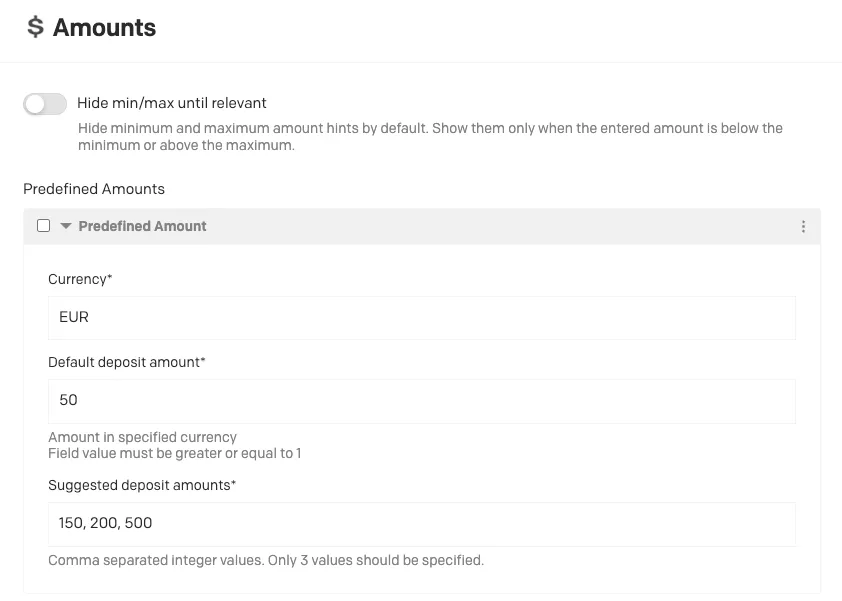 As set in the Back Office
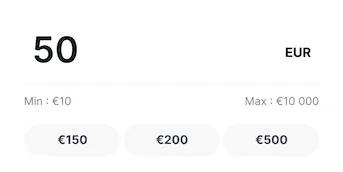 As shown in the cashier
Hide min/max until relevant
Section titled “Hide min/max until relevant”By default, the cashier shows the minimum and maximum as helper text under the amount input. With this setting enabled, on the deposit flow:
- The min and max helper text is hidden when the amount step loads, whatever the default amount.
- The minimum appears only when the player enters an amount below it, and the maximum only when they enter an amount above it.
- As soon as the amount is back in range, both are hidden again.
The space under the input is reserved, so the input never shifts when a message appears. A short delay is applied before an error shows, so players don’t see a red flash while still typing (typing “200” against a minimum of 20 doesn’t show “below min” on the way through “2”).
The withdrawal flow always shows the min and max, so players know the most they can take out.
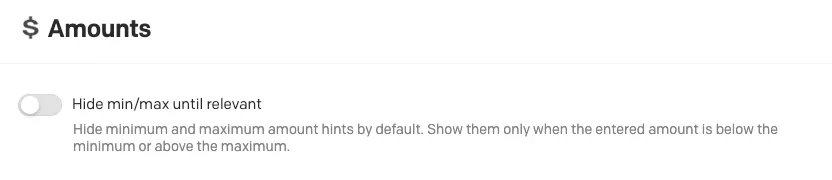 As set in the Back Office
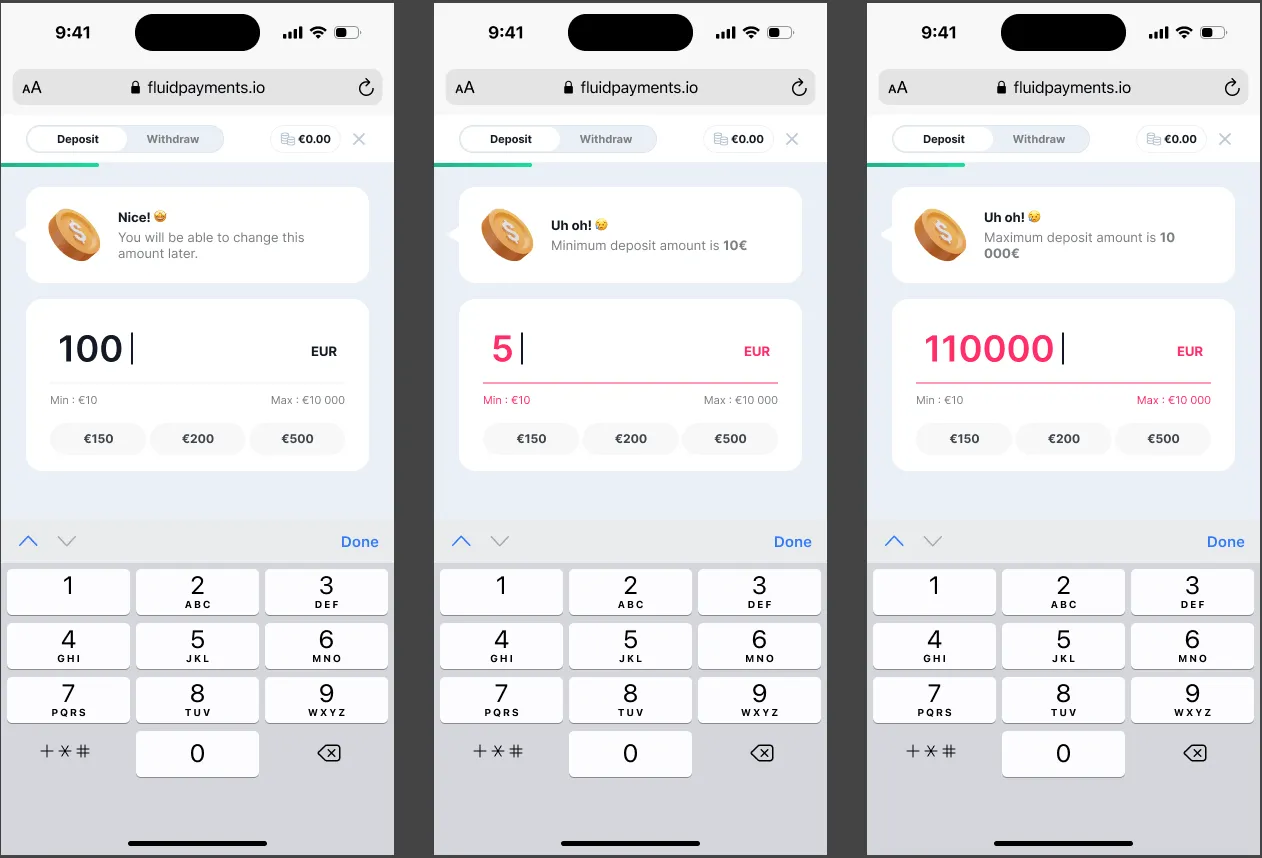 Setting off: the min and max are shown
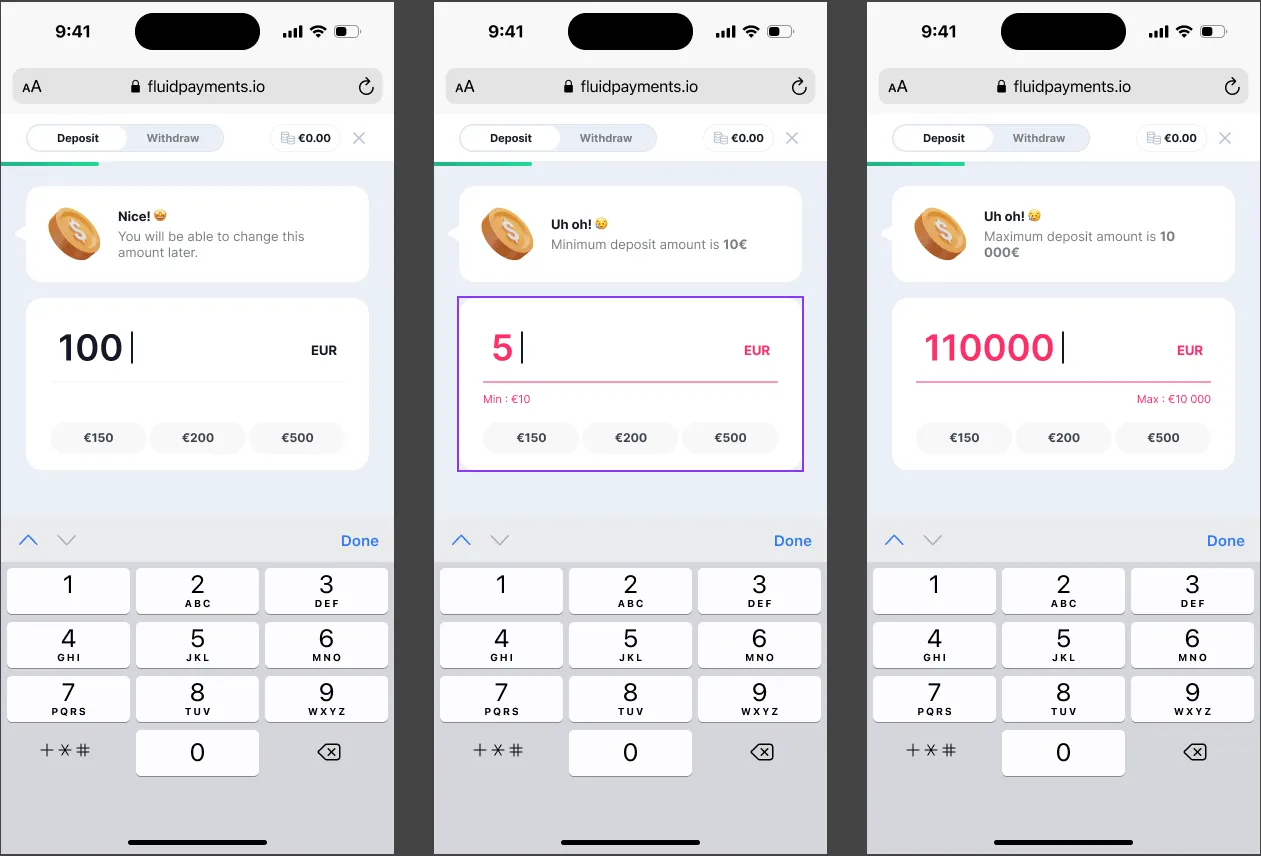 Setting on: the min and max are hidden
Wallet Position
Section titled “Wallet Position”| Option | Behaviour |
|---|---|
Drawer on the left (LEFT) |
Slides out from the left and occupies the left side of the window |
Centred (CENTER) |
Slides up from the bottom and occupies the centre of the screen |
Drawer on the right (RIGHT) |
Slides out from the right and occupies the right side of the window |
Embedded (INLINE) |
Embedded in a container element on your page |
For the drawer and centred positions, the cashier adds style="overflow: hidden; touch-action: none;" to the body tag while it’s open, to stop the page scrolling behind it.
Embedded (inline) wallet
Section titled “Embedded (inline) wallet”- No animation: apply any animation to the parent element.
- No close button in the header.
- No inline style is added to the
bodytag. - The wallet fills 100% of its container (
inline-size: 100%; block-size: 100%). Set the size on the wrapper (parent element). Scrolling happens inside the wallet, so the wrapper needs nooverflow.
Recommended wrapper sizes:
- Small devices: position the wrapper absolutely so it covers the viewport; minimum width 320px.
- Tablet layout: kicks in at 480px; give the wrapper an
inline-sizeorblock-size. - Maximum size: the wallet’s maximum inline size is 439px, so a larger wrapper is unnecessary.
.wrapper-widget {  position: fixed;  inset: 0;
  @media only screen and (min-width: 480px) {    block-size: 600px; /* or 100vh */    inline-size: 440px;    position: relative;  }}
By default the wallet uses overscroll-behavior: contain, so scrolling stays inside it. To let the page scroll once the wallet reaches its limit, see overscroll-behavior-auto.
Delay to Waiting Approval
Section titled “Delay to Waiting Approval”When the player opens the wallet, Fluid shows their withdrawals that the provider hasn’t processed yet, each with a progress bar and a Cancel Withdrawal option. The progress bar has three stages:
- Requested: the player has submitted the withdrawal.
- Processing: the withdrawal is being handled.
- Approved: approved by the provider. Players never see this stage, because processed withdrawals are no longer listed.
A withdrawal starts as Requested. Once the number of hours in Delay to Waiting Approval (Hours) has passed and the provider still hasn’t processed it, it shows as Processing the next time the player opens the wallet. For example, with a delay of 2 hours, a withdrawal requested at 10:00 shows as Processing if the wallet is opened after 12:00.
The progress bar is visual only and doesn’t affect the transaction. Players can cancel a withdrawal at any time before the provider approves it.
Contact Support
Section titled “Contact Support”When a transaction fails, the cashier can show a Contact Us button. Clicking it emits the contact-support event so you’re notified, and opens the Contact Support link if one is set. Leave the link empty for the notification only, or use mailto: followed by an address (e.g. mailto:[email protected]) to open the player’s email app.